
Adding Copilot to Power BI Desktop is a great step toward faster report development. It can help users create visuals, ask questions about data, write DAX, and document measures. However, after testing it on the Contoso Sales model, one thing became clear: Copilot is useful, but it still needs a developer’s review.
It is not yet a tool that takes a raw semantic model and delivers a fully polished business dashboard. It can create a good starting point, but the final quality still depends on the person designing the report, checking the logic, and improving the user experience.
The Main Difference: Report Generator vs. Development Assistant
The first test was simple. I used the Contoso Sales model, which contained only the data model and no report visuals. I asked Copilot to create an executive sales overview page with KPI cards, a sales trend, product category analysis, channel analysis, and a detailed product table.
Copilot created the page. That part worked.
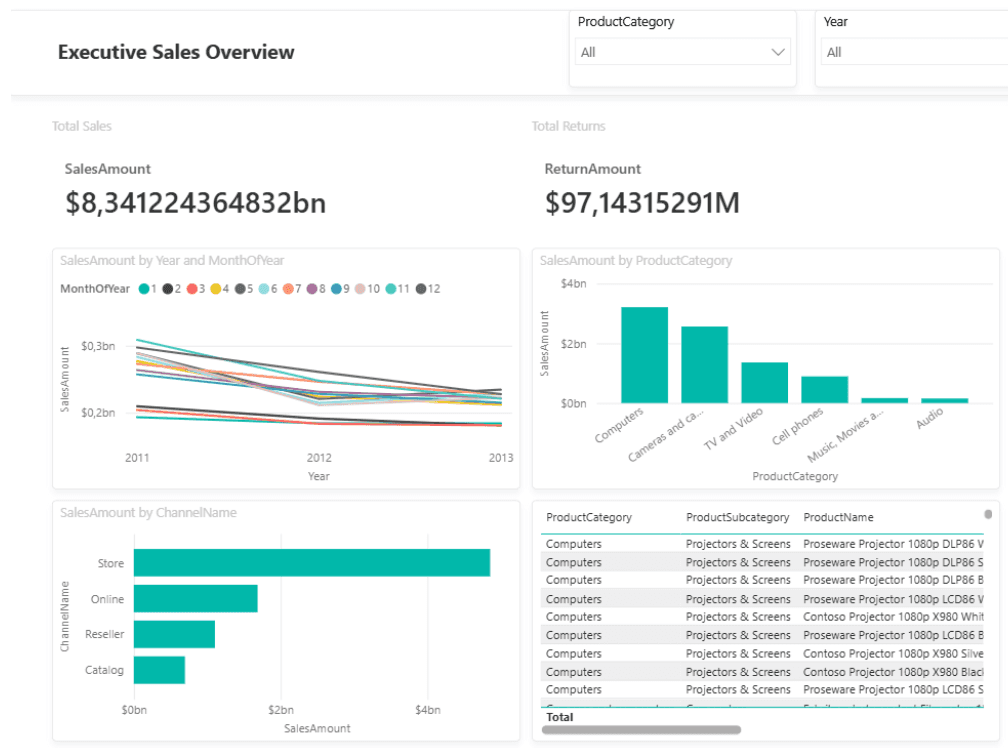
Figure 1. Copilot-generated Executive Sales Overview page in Power BI Desktop based on the Microsoft Contoso Sales sample model
The report included a title, slicers, KPI cards, charts, and a table. For a first draft, this was impressive because it quickly turned an empty canvas into something usable for exploration. However, the result was not ready to be shared with business users.
The KPI cards were basic and not visually polished. Number formatting was not clean, with values shown in long decimal formats instead of simple business formats like $8.34B. The table had too many rows and needed scrolling, which made it hard to read on an executive page. The line chart was also not very clear because the monthly trend was split in a way that made interpretation harder.
This is a good example of where Copilot stands today. It can help you start, but it does not fully replace report design skills.
Where Copilot Worked Better: DAX Measure Creation
The more valuable test was not visual creation. It was DAX support.
I asked Copilot to create sales performance measures using columns from the Sales table, such as SalesAmount, DiscountAmount, ReturnAmount, TotalCost, SalesQuantity, and ReturnQuantity.
Copilot generated useful measures such as:
Total Sales = SUM(Sales[SalesAmount])
Total Discount = SUM(Sales[DiscountAmount])
Total Returns = SUM(Sales[ReturnAmount])
Net Sales = [Total Sales] - [Total Discount] - [Total Returns]
Gross Profit = [Net Sales] - [Total Cost]
Gross Margin % = DIVIDE([Gross Profit], [Net Sales])
Average Selling Price = DIVIDE([Net Sales], [Units Sold])
This is where Copilot felt more practical. Instead of starting from a blank formula bar, the developer can describe the required business logic and get a first version of the DAX measures. The formulas still need to be checked, but the starting point is created much faster.
The Important Part: Business Definitions Still Matter
One interesting example was the Return Rate % measure.
Copilot first created it as:
Return Rate % = DIVIDE([Return Quantity], [Units Sold])
This is not necessarily wrong. It means return rate based on quantity: returned units divided by sold units.
But return rate can also mean return value divided by sales value. After asking Copilot to explain this, it correctly separated the logic into two measures:
Return Quantity Rate % = DIVIDE([Return Quantity], [Units Sold])
Return Value Rate % = DIVIDE([Total Returns], [Total Sales])
This is an important lesson. Copilot can generate DAX, but it does not automatically know the business definition used by the organization. The developer still needs to decide what the measure should actually mean.
Validation Queries: A Strong Practical Use Case
Another useful test was asking Copilot to create a DAX query to validate the measures.
The prompt asked for a summary by Calendar Year and Product Category, including Total Sales, Total Discount, Total Returns, Net Sales, Total Cost, Gross Profit, Gross Margin %, Units Sold, Return Quantity, Return Quantity Rate %, and Return Value Rate %.
Copilot generated a DAX query using SUMMARIZECOLUMNS and sorted the result by Year and Net Sales.
This is a very practical use case. After creating measures, the developer can immediately test whether the numbers behave correctly by year, product category, channel, or any other business dimension. This makes Copilot useful not only for writing DAX, but also for checking it before using it in report visuals.
Explaining DAX in Business Language
Copilot was also helpful when asked to explain the measures.
For example, it explained Net Sales as money earned from sales after subtracting discounts and returns. It explained Gross Margin % as the share of net sales kept after product costs. It also explained why DIVIDE is safer than the standard / operator in DAX, because it handles zero or blank denominators without breaking the visual.
This may sound simple, but it is useful in real projects. Developers often need to explain measures to business users, document logic, or prepare handover notes. Copilot can create a clear first version of that explanation.
Measure Descriptions and Semantic Model Quality
Another strong use case was measure documentation.
Copilot created short business-friendly descriptions for measures such as Total Sales, Net Sales, Gross Profit, Gross Margin %, Average Selling Price, Discount Rate %, and Return Value Rate %. These descriptions can be added to the semantic model so users understand what each measure means and when it should be used.
This is important because measure descriptions are often skipped. They feel like extra documentation work. Copilot reduces this effort by generating a first draft that the developer can review and improve.
A better documented semantic model is also easier to use with AI features. Clear names, good descriptions, and business-friendly measures make it easier for Copilot to understand what the user is asking for.
What Still Needs Improvement
The report generation experience is promising, but not perfect.
Copilot can create visuals, but it does not always create a clean report layout. It may choose charts that are technically correct but not the best for storytelling. It may create tables that are too detailed for an executive page. It may also use raw fields instead of properly formatted business measures.
This means that report design, visual hierarchy, formatting, and business storytelling are still human tasks.
Copilot is also dependent on the semantic model. If table names, column names, relationships, and measures are unclear, the output will also be weaker. In other words, Copilot does not remove the need for good modeling. It makes good modeling even more important.
Conclusion
Copilot in Power BI Desktop is already useful, but its best role today is not “build the final dashboard for me.”
Its stronger role is as a development assistant.
It can help create a first report page, but that page will usually need manual cleanup. It can draft DAX measures, but the logic still needs validation. It can explain formulas, but the explanation must be checked against the business context. It can generate measure descriptions, but the model author should still decide whether the wording is accurate.
The most practical way to use Copilot today is to treat it as a way to remove friction from repetitive work: starting a report, drafting DAX, testing measures, explaining logic, and documenting the model.
The future looks interesting. If Copilot becomes better at understanding report design, business context, and semantic model structure, it could become a much stronger part of the Power BI development process. For now, it is not a replacement for Power BI developers. But it is already a useful assistant that can speed up many parts of their daily work.
Mateusz Malik
Business Intelligence Developer
Jun 26, 2026
Looking for a trusted partner for your next cloud project?
Reach out to us and tell how we can help
Featured

Cloudfide’s Business Intelligence Newsletter – SEPTEMBER 2026
Sebastian Jagniątkowski
Sep 14, 2026
Cloudfide’s Business Intelligence Newsletter – AUGUST 2026
Sebastian Jagniątkowski
Aug 10, 2026
Cloudfide’s Business Intelligence Newsletter – JULY 2026
Sebastian Jagniątkowski
Jun 26, 2026
Helpful Assistant, Not a Full Report Developer
Mateusz Malik
Jun 26, 2026